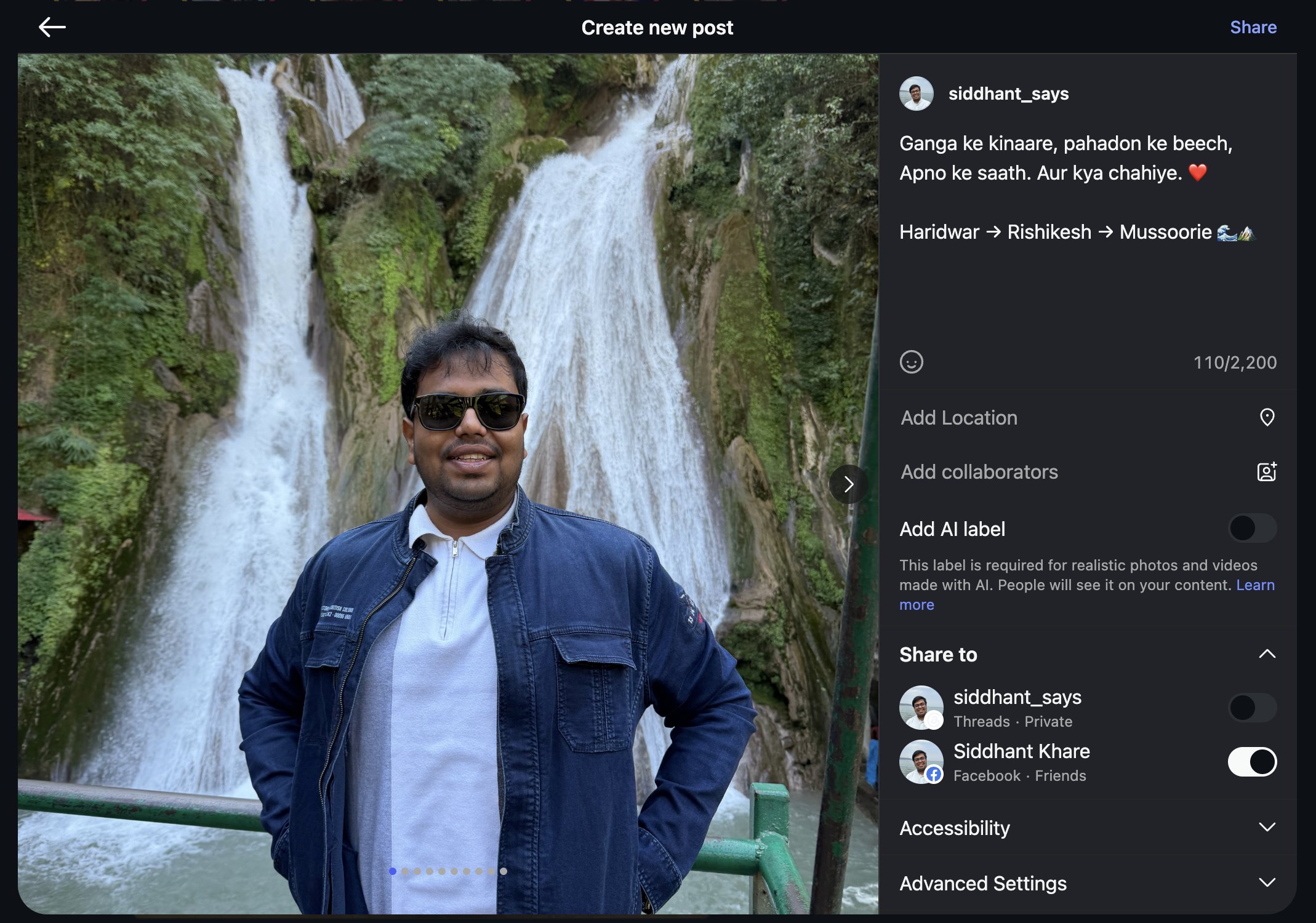
I asked Codex for ten photos for Instagram. Then I asked it to replace the second one.
Then another portrait. Then a photo that needed more river and surroundings.
My family had just returned from Delhi, Haridwar, Rishikesh and Mussoorie. The saved trip selection held 352 photos and 28 videos: us by the Ganga, the hills, a waterfall, and several versions of almost the same pose. I wanted a few of me, one or two with Maa and Papa, and room for the places too.
The useful part was being able to change my mind. Codex could retrieve a candidate, show it to me, and carry that exact choice into the next version of the shortlist. Every change still pointed to a particular photo in my library.
Along the way, a synthetic test exposed a film that rendered successfully and lost its music after a quarter of a second.
I had built Memory Journal MCP Server in January 2025. Its first commit is dated January 26. This trip gave the project a job that went beyond finding a photo by place or person.
Find the trip before choosing the cover
The server reads the local Apple Photos catalogue through osxphotos. It exposes that catalogue to a desktop assistant through MCP, the protocol the client uses to discover and call its tools.
The early version could search by location, people and labels. This workflow needed dates, bounded pages and a way to inspect the same asset after a result list changed. We added those in PR #4.
Here is a request to the current search-photos tool, rechecked on November 1:
{
	"start_date": "2026-10-24",
	"end_date": "2026-10-30",
	"timezone": "Asia/Kolkata",
	"media_type": "all",
	"limit": 25
}
The response's paging fields were:
{ "total": 430, "returned": 25, "next_offset": 25 }
That is one page, not the whole trip. The client continues with the same filters and the returned offset. Each record carries a UUID for a particular Photos asset. get-photo-preview accepts that UUID and returns a JPEG preview from files already on this Mac, capped at 1024 pixels and 1 MiB with embedded metadata removed.
A date match still needs review. Our saved trip selection contained 380 of those 430 assets: 352 photos and 28 videos. Fifty date-window assets sat outside it. The analytics below use that exact saved selection, rather than silently treating everything from those seven dates as holiday material.
The request and response excerpt omits every per-photo record. The full private catalogue is not part of this article.

A shortlist needs a revision loop
The first ten were a proposal. I asked for a better second photo, replaced another portrait and asked for more river and surroundings shots. That back-and-forth was closer to editing than sorting.
An existing Photos person tag can help find a family photo. Capture time can put nearby shots together. A preview can show whether a frame works beside the previous one. None of those fields specifies the mix I wanted in the post.
Stable IDs made the revisions manageable. A filename can repeat across imports. A UUID lets the client ask for details or a preview of the same asset, then keep it in the shortlist while changing its position. I reviewed previews and used full-resolution originals for posting; the MCP server does not export or publish them.
After the carousel was chosen and posted, I asked what else the trip's metadata could tell me. That is where the journal and film work began.
One day accounted for 38% of the selected photos
October 28 contributed 135 of the 352 selected photos, 38.4%.
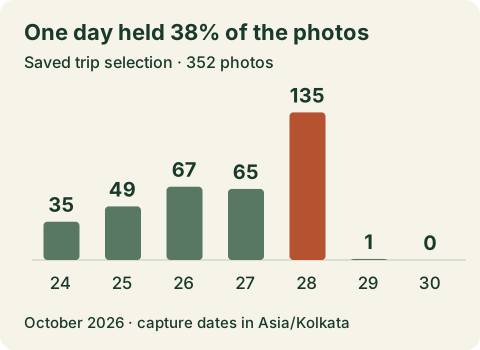
For a future carousel, that is a reason to look across days before picking from the largest pile. Otherwise, one day could stand in for the whole trip.
The rapid-capture view gave another way into the pile. With adjacent gaps of at most five seconds, it found 86 candidate groups containing 212 photos, about 60% of the stills. I could compare expressions and framing within a group instead of hunting through a flat list.
These are temporal groups, not proven duplicates. Five seconds can contain a different person or a better view of the river. The report also offers preview-hash comparisons, but a similar thumbnail remains a candidate for review. Neither grouping deletes an original.
A vertical crop can lose the thing you travelled for
The selection contained 208 vertical photos and 144 horizontal ones. A vertical edit needs to make room for photos from both groups.
Across the 352 photos, a geometric 4:5 crop retained an average of 79.7% of the frame area. A 9:16 crop retained 61.7%. Those values use dimensions alone; they cannot tell where a face or the waterfall sits.
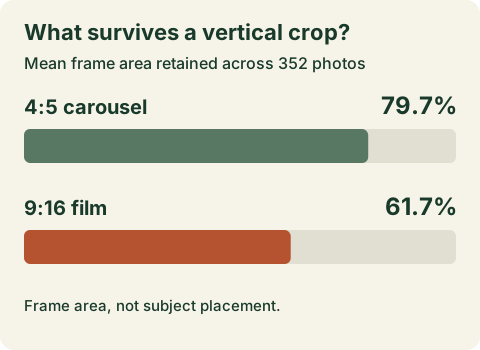
For the carousel, the report lets me move the crop and inspect what leaves the frame. For the film, I kept the complete foreground image over a blurred background. The river and the people could stay in view together.
These controls became part of a seven-view local journal in PR #5. It also includes family-tag coverage, camera details, shot comparisons and local-file availability. The views share a selection, so I can move from a capture pattern to a candidate photo and then to an edit.
Most of the stills already had motion
Photos marked 343 of the 352 stills as Live Photos, about 97%. Local motion files were available for 329 photos. The 28 separate video assets are counted independently; Live Photo companions are not added to that video count.
That made a travel film possible from much of the same material. I selected clips in the Motion view, added more images to the plan, and asked for energetic music.
The saved plan carries UUIDs in order. A private media index resolves those IDs to local files. An explicit Regenerate video action starts FFmpeg and writes a new derivative file. Changing the plan means rendering another output; the original media and previous export stay in place.
This is what interested me in Copilot's queryable task state: the current plan has a representation outside the conversation. Here that representation is a small JSON document holding the chosen asset IDs and order.
The fast preset uses four beats per clip. At 130 BPM, that is about 1.85 seconds each; the balanced preset uses six beats. Timing follows the BPM I supply, rather than detecting beats in the audio. Short motion clips hold their last frame to fill the slot. The renderer can use a local soundtrack with attribution and mute the source audio.
A missing local motion file stops the render with an error. A metadata record is not proof that its media is on disk. I have to download missing originals through Photos myself, and supply music I have permission to use.
A successful render can still end in silence
During review, a synthetic fixture exposed a bug that a successful FFmpeg exit could not catch. The fixture used a generated blue video twice, with a quarter-second sine wave as its soundtrack. At the fast preset, the output ran for 3.7 seconds.
The video was valid. The audio ended at 0.25 seconds.
I replayed that fixture against the earlier renderer and the fixed version on November 1:
| Renderer | Video stream | Audio stream |
|---|---|---|
| Before the fix | 3.70 seconds | 0.25 seconds |
| With soundtrack looping | 3.70 seconds | 3.70 seconds |
The saved check pins both source revisions and the fixture settings. It uses no trip photos or music. Both versions left the generated source unchanged; the difference was in their output.
The regression test now probes the audio duration and decodes a short sample near the end. Checking that an audio stream exists would have missed the bug. The test also requires that late sample to contain non-silent audio.
That test sits in a 96-test suite, which I reran on the same pinned server revision. The cases exercise boundaries a preview cannot show:
- Real MCP stdio exchanges check discovery before the library loads, validated requests, bounded results and actionable permission errors.
- Real loopback HTTP requests check byte ranges against a 16-byte fixture. Asking for bytes 2–5 must return those four bytes with status 206; an invalid range gets 416.
- A forced plan-save failure must return an actionable error and leave the render queue empty, rather than blocking later work behind a job that never started.
- Plan validation rejects duplicate or out-of-selection UUIDs. The FFmpeg fixture checks manifest order, source preservation and refusal to overwrite an existing output.
These tests use synthetic metadata and generated media. They run without a personal Photos library or a model provider. The HTTP cases and stdio cases are in the repository. In a checkout with FFmpeg installed, the soundtrack regression can be run on its own:
uv sync --locked
uv run python -m pytest -q tests/test_film.py -k real_ffmpeg
It checks a generated file. Deciding which family moment belongs in the film still needs me.
The location feedback changed the defaults
After I shared the workflow, someone pointed out that photo metadata can reveal where you have been beyond the pictures you meant to discuss. A request for holiday photos should not quietly turn into a location history.
Location and person-name output are now off by default. City output needs both a host setting and an explicit tool request. Names need an exact existing Photos tag on a host allowlist and an explicit request for that tag. The tools never return precise photo coordinates or identify new faces.
A picture, filename or matching count can still reveal context. These output controls are not anonymization, and they do not constrain other file-access tools the host may have. The Python server makes no model API calls, but a client using a hosted model may send it the returned metadata and previews.
I kept the report and media index outside public repositories. The published data here is an aggregate snapshot, alongside the cover image I chose to share.
Run the same workflow on your Mac
The MCP server needs macOS, Apple Photos, Python 3.11 or newer and uv:
git clone https://github.com/Siddhant-K-code/memory-journal-mcp-server.git
cd memory-journal-mcp-server
uv sync --locked --no-dev
The desktop setup guide has launch configurations for ChatGPT Desktop with local MCP settings, Codex Desktop/CLI, Claude Desktop and Cursor, plus the macOS permission steps. Use a local stdio connection; the film editor's browser URL is a separate HTTP app, not an MCP endpoint. FFmpeg is only needed when you render a film.
Once connected, use search-photos with your dates, follow its pages, and inspect a few UUIDs with get-photo-preview. Build a shortlist before requesting analytics for the selected UUIDs. Your library will return its own counts.
What I checked
The aggregate snapshot records the date window, selection size, daily counts, mode flags, crop geometry and local availability. I rechecked the saved 380-asset selection through the live MCP analytics tool on November 1. Crop values are means of per-photo geometric area retained; rapid groups use the five-second adjacency rule. Availability is a snapshot. Mode flags overlap.
The raw selection stays private. These aggregates document my run, but a reader cannot independently reconstruct them from public per-photo records. I have omitted the photo UUIDs, filenames, people tags, filesystem paths and precise coordinates.
I did not measure time saved, token cost or model-ranking quality. The regression checks establish behavior on their fixtures; the trip counts describe my saved selection. This is an account of one trip and the workflow it produced.
I could ask for a different river photo without rebuilding the selection from scratch.
The second photo changed. The waterfall stayed first.