An engineer opens Claude Code, Cursor, Codex, or an internal agent. They connect GitHub, Slack, Linear, Postgres, Sentry, Datadog, and a filesystem MCP server. Then they ask the agent to debug a production issue.
The agent can now read docs, inspect logs, query data, open tickets, edit code, and maybe deploy.
The team calls this productivity.
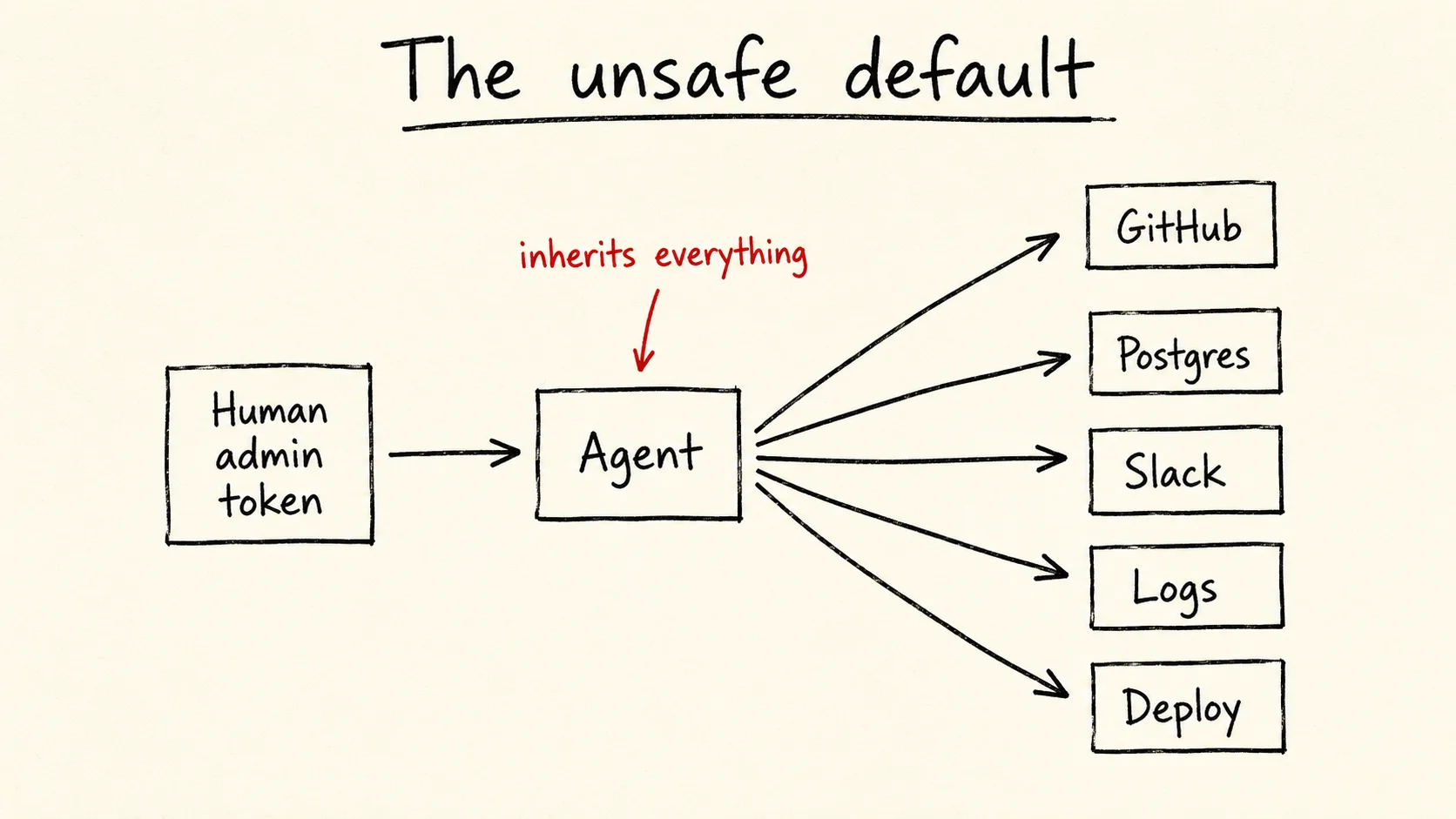
But it is also a human admin token behind a chat box.
That is the problem.
I wrote about the local version of this in Claude Code's broken permission model. This post is about the team version.
Agents should not get your full access
Most companies already know how to grant access to people.
Alice joins the payments team. She gets repo access, dashboard access, and database access. Some access is read-only. Some requires approval. Some is blocked in production.
That model is not perfect, but it has a shape.
Agents break the shape.
The old question was:
Can Alice access this resource?
The new question is:
Can this agent, acting for Alice, during this task, call this tool, on this resource, with these arguments?
That is not the same question.
If the answer is "Alice is logged in, so the agent can do whatever Alice can do," you have not built agent access control. You have forwarded Alice's credentials.
That works for demos. It fails in real systems.
An agent does not need all of Alice's access. It needs the access Alice delegated for one task.
That is the core rule:
Give agents delegated access, not inherited access.
Inherited access says:
Alice can do X, so the agent can do X.
Delegated access says:
Alice asked this agent to do this task, so the agent can do this narrow set of actions for this period of time.
The second model takes more work. It is also the one that scales.
MCP makes this urgent
MCP made it easy to connect agents to tools. That is why developers like it.
A tool exposes a manifest. The client wires it in. The model can now call GitHub, a database, a browser, a filesystem, or an internal API through the same pattern.
It also widens the blast radius.
Each MCP server is a new access path. Each tool description enters the model's context. Each tool argument can carry sensitive data. Each call can read data, write data, or change state.
When one engineer installs one server, trust may be enough.
But systems grow.
One team adds GitHub. Another adds Postgres. A platform team adds incident tools. A data team adds the warehouse. Someone adds local filesystem access because it saves time.
Now the agent has a tool menu that no single person owns.
Most failures will not look dramatic. They will look boring:
- The agent reads a file it did not need.
- The agent sends customer data to the wrong tool.
- The agent uses a write tool when read-only access would have worked.
- The agent acts on stale context.
- The agent follows instructions from a tool response that should have been treated as data.
- The agent does the right thing, but nobody can explain why it was allowed.
This is not an AI ethics problem. It is an access control problem.
Control the tool call
Do not start by trying to govern the whole agent session.
A session contains many things: reads, writes, retries, summaries, errors, and cleanup. If you allow the whole session, you allow too much. If you block the whole session, people route around you.
The tool call is the right unit.
For every tool call, the system should know:
- who started the agent
- which agent is acting
- what task is active
- which tool is being called
- which operation is requested
- which resource is touched
- which arguments are passed
- why the call was allowed or blocked
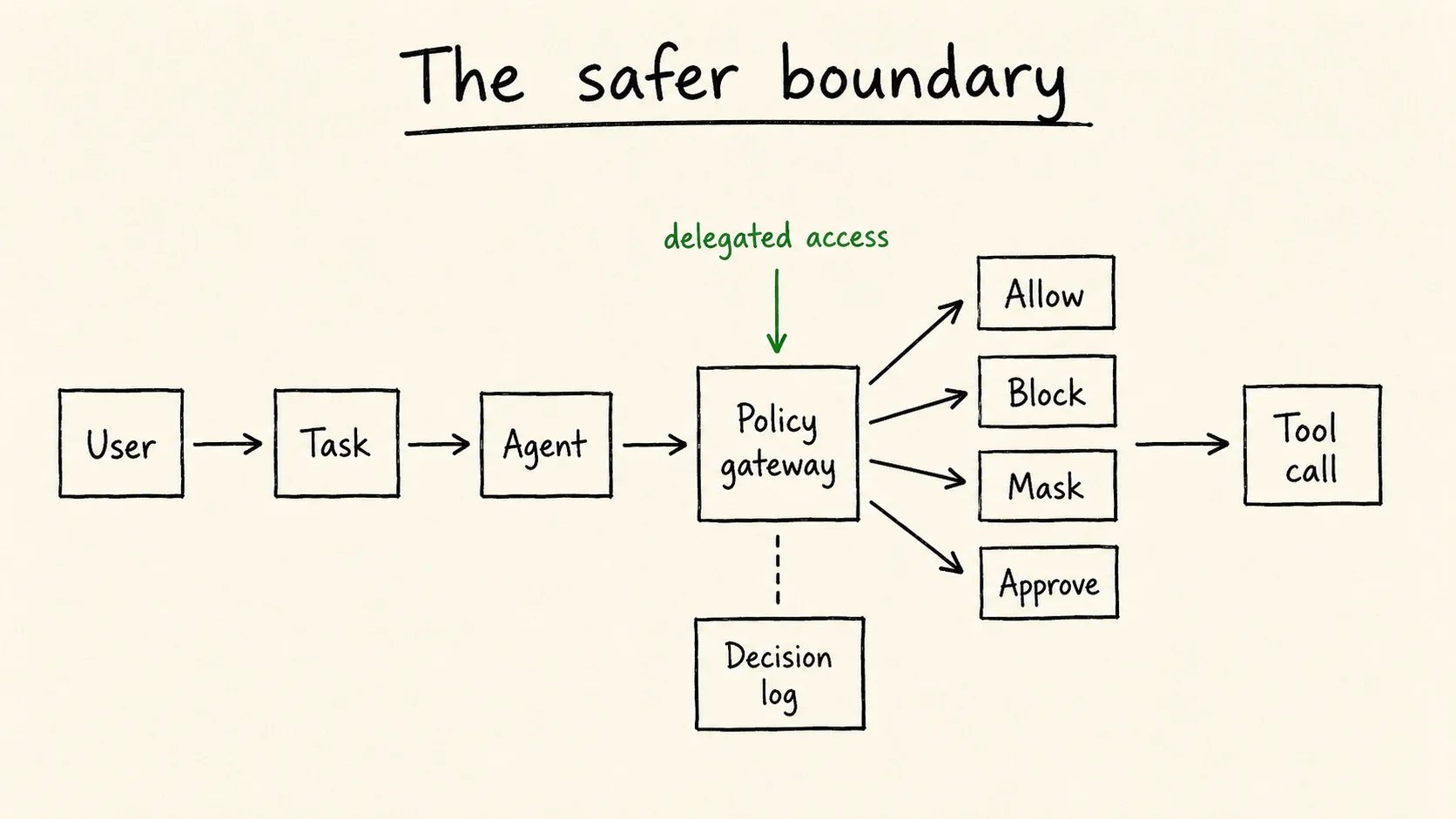
That gives you a simple boundary:
agent -> policy gateway -> MCP tool / API / database
              |
              +-> decision log
The agent can ask. The gateway decides. The tool only sees calls that passed policy.
That is the layer most teams are missing.
"Can use GitHub" is not a permission
Many teams start with broad permissions:
This agent can use GitHub.
That is too vague.
GitHub is not one action. It is read issue, list repo, read file, create branch, open PR, comment, request review, merge PR, delete branch, edit workflow, and more.
A useful policy names the operation and the resource:
agent:code-reviewer can read repo:payments
agent:code-reviewer can comment_on pr:payments/*
agent:code-reviewer cannot merge pr:payments/*
agent:code-reviewer cannot read secret:payments/*
That is better. But it still misses the task.
Now add delegation:
agent:code-reviewer can comment_on pr:payments/123
  if user:alice requested task:review-pr-123
  and user:alice is reviewer of pr:payments/123
This is where relationship-based access control fits. OpenFGA is the open source implementation I use for this kind of model.
Access comes from relationships:
- Alice is on the payments team.
- The payments team owns the payments repo.
- PR 123 belongs to the payments repo.
- The agent is acting for Alice.
- The active task is review-pr-123.
- The task allows comments, not merges.
The agent does not get Alice's full access. It gets the slice of access needed for the task.
That is the difference between safe automation and credential forwarding.
Roles are not enough
It is tempting to create a few roles:
- read-only agent
- coding agent
- incident agent
- admin agent
Roles are fine as defaults. They do not solve the hard part.
The hard part is context.
A coding agent may read one repo but not another. An incident agent may read production logs during an active incident but not on a normal Tuesday. A support agent may read one customer's tickets but not the whole table. A research agent may need public web access before internal docs, because the order affects what context it carries.
Roles flatten those details.
Relationships keep them.
Your company already has the right nouns: users, teams, repos, projects, customers, incidents, documents, environments, approvals, and owners.
Use those nouns in the access model.
Log the decision, not just the request
A normal log tells you whether the request worked.
That is not enough.
For agents, you also need to log the access decision:
- subject: user and agent
- action: tool and operation
- object: resource
- context: task, session, repo, environment, or customer
- decision: allow, deny, mask, rewrite, or require approval
- reason: policy, relationship, or approval
This log helps engineers debug. It helps security review access. It helps leaders answer the first question after an incident:
Why was the agent allowed to do that?
If you cannot answer that, your trace has a hole in the middle.
Start small
Do not start by building a huge platform.
Put a gateway in front of a few tools. Make tool calls pass through it. Log the decision. Block the obvious bad actions. Keep the policy boring. That is the pattern behind agentic-authz.
Start with four actions:
- allow
- block
- mask
- require approval
For example:
allow read_file on /docs/**
block read_file on **/.env
mask content.email before sending to external_tool
require approval for deploy to production
This is enough to change the system.
You can add more later:
- OpenFGA checks
- policy tests in CI
- session replay
- approval workflows
- anomaly detection
- access reviews
But the first step is simple: put policy between the agent and the tool.
Questions leaders should ask
If your team uses agents, ask these questions this week:
- Which tools can our agents call?
- Which tools can read sensitive data?
- Which tools can write or change state?
- Do agents use human tokens, scoped tokens, or delegated tokens?
- Can we block one tool operation without disabling the whole tool?
- Can we explain why a tool call was allowed?
- Can we replay what the agent did?
- Can we remove an agent's access without removing a human's access?
- Can we prove production writes require approval?
- Who owns this?
The last question matters most.
This cannot belong only to security. Security owns risk and audit. Platform owns the developer path. Identity owns the source of truth. AI engineering owns agent behavior.
But one team needs to own the boundary.
If everyone owns agent access, nobody owns it.
The decision
Your engineers will use agents. Your vendors will add agents. Your internal tools will expose agent-callable APIs.
The question is not whether agents should have power.
The question is how they get it.
You can give agents human credentials and hope prompts keep them in line.
Or you can give agents narrow access, tied to a task, checked at every tool call, and logged with a reason.
The first path is faster for a month.
The second path is faster for the next five years.
Build the permission layer before the first serious incident forces you to.
Related: Authorization patterns for AI agents and You're tired because your AI has no feedback loop.
I write about AI agent infrastructure, authorization, and security. You can find me on X or LinkedIn.